顯示具有 ACL 標籤的文章。 顯示所有文章

2019/04/18

Troubleshoot IPv6 Network Connectivity

11Step 1:

PC1>ping SRV1
Type escape sequence to abort.
Sending 5, 100-byte ICMP Echos to 2001:DB8:0:4::30, timeout is 2 seconds:
.....
Success rate is 0 percent (0/5)

2019/04/16

Configure and Verify IPv4 Extended Access Lists


8
R1(config)#ip access-list extended Example4
R1(config-ext-nacl)#deny udp ?
  A.B.C.D       Source address
  any           Any source host
  host          A single source host
  object-group  Source network object group

R1(config-ext-nacl)#deny udp any ?
  A.B.C.D       Destination address
  any           Any destination host
  eq            Match only packets on a given port number
  gt            Match only packets with a greater port number
  host          A single destination host
  lt            Match only packets with a lower port number
  neq           Match only packets not on a given port number
  object-group  Destination network object group
  range         Match only packets in the range of port numbers

2019/04/15

[CCNA Note]StaticNAT/PAT/RIP/Aoto-Summary


[CCNA Notes] Configuring extended ACLs

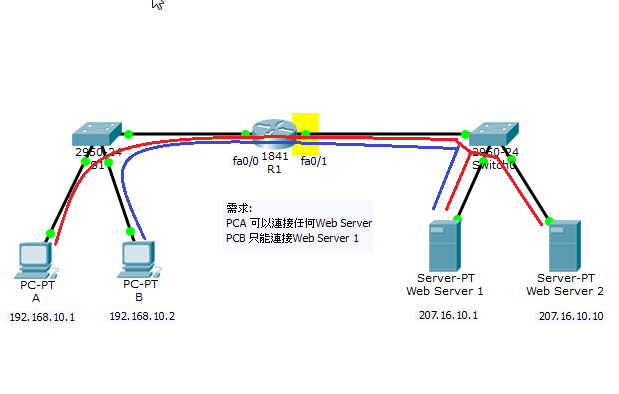
此 lab 一定要用 extended 模式,因為 standard 只能限制來源 PCB 過或不過,不能限制只讓它連Srv1


延伸ACL的介面要盡可能靠近拒絕流量的來源,如此才能在不需要的流量流經網路之前將其過濾掉。
To be more precise when matching a certain network traffic, extended access lists are used. With extended access lists, you can match more information, such as:

  • source and destination IP address
  • type of TCP/IP protocol (TCP, UDP, IP…)
  • source and destination port numbers
  • service (Telnet、WWW、ftp...)
Two steps are required to configure extended access lists:
1. configure extended access lists using the following command:
(config) access list NUMBER permit|deny IP_PROTOCOL SOURCE_ADDRESS WILDCARD_MASK [PROTOCOL_INFORMATION] DESTINATION_ADDRESS WILDCARD_MASK PROTOCOL_INFORMATION

[CCNA Notes] Configuring standard ACLs

To create an standard access list on a Cisco router, the following command is used from the router’s global configuration mode:
R1(config)# access-list ACL_NUMBER permit|deny IP_ADDRESS WILDCARD_MASK
NOTE
ACL number for the standard ACLs has to be between 1–99 and 1300–1999.
                               extended ACLs has to be between 100–199 and 2000–2699.
 You can also use the host keyword to specify the host you want to permit or deny:
R1(config)# access-list ACL_NUMBER permit|deny host IP_ADDRESS
Once the access list is created, it needs to be applied to an interface. You do that by using the ip access-group ACL_NUMBER in|out interface subcommand. in and out keywords specify in which direction you are activating the ACL. in means that ACL is applied to the traffic coming into the interface, while the outkeyword means that the ACL is applied to the traffic leaving the interface.
* IPv6 不支援 standard ACLs

R1(config)#access-list ?
<1-99> IP standard access list
<100-199> IP extended access list
R1(config)#access-list 10 permit ?
A.B.C.D Address to match
any Any source host
host A single host address
R1(config)#access-list 10 permit 192.168.10.1
R1#sh access-lists
Standard IP access list 10
10 permit host 192.168.10.1